MeshCore IDs & avoiding collisions
Guide · updated August 2026
Every repeater that relays a packet stamps the first byte(s) of its Public ID into the route. How many bytes it stamps — the path hash length — is what decides whether two repeaters can be mistaken for each other. What 1-, 2- and 3-byte really mean, what talks to what, and why we now run 3-byte on everything.
Will it still talk? Byte settings & compatibility
First, the question everyone asks: does your byte setting have to match the other node’s? Almost never — byte size is about ID detail, not whether a link exists. The real gate is firmware version. Two knobs people mix up:
- Companion (the sender) sets the hash size stamped on every message it originates (app → Settings → Experimental Settings, v1.41.0+).
- Repeater —
set path.hash.modeonly sizes its own adverts, not what it forwards.
Every repeater on firmware v1.14.0+ forwards all three sizes. Older ones forward only 1-byte and silently drop 2- and 3-byte packets — so a multi-byte message needs every repeater in its path on v1.14.0+.
| Message size (set by sender) | Path all v1.14.0+ | Any pre-1.14 in path |
|---|---|---|
| 1-byte (default) | ✓ Delivered | ✓ Delivered |
| 2-byte | ✓ Delivered | ✗ Dropped |
| 3-byte | ✓ Delivered | ✗ Dropped |
Two companions on different settings? Each message rides at the sender’s size — the receiver’s setting is irrelevant — so a 1-byte and a 3-byte companion can be one-sided where older repeaters remain:
| Sender | Rides as | Gets through? |
|---|---|---|
| 1-byte companion | 1-byte | ✓ Always — reaches everyone |
| 3-byte companion | 3-byte | Only if every repeater in the path is v1.14.0+ — otherwise ✗ dropped |
What 3-byte costs. The path field is capped at 64 bytes, so bigger stamps fill it sooner and the maximum route gets shorter: 64 hops at 1-byte, 32 at 2-byte, 21 at 3-byte. That ceiling is theoretical — real traffic dies to timeouts and collisions long before 21 hops, and our mesh runs a small fraction of that. It is not a reason to stay on 1-byte.
RF Lab convention: 3-byte on everything. Companions and repeaters alike — set path.hash.mode 2 on a console, or Settings → Experimental Settings in the app. We used to keep companions on 1-byte so their traffic could cross pre-1.14 repeaters, which silently drop anything bigger. That constraint has expired — the repeaters here all run current firmware, so nothing drops a 3-byte packet any more. And the reason to move is real: 1 byte allows only 256 distinct stamps, so the odds that two repeaters share one reach a coin flip at about 19 repeaters and near-certainty past 40. Three bytes gives 16.7 million, which takes the problem off the table for good.
Public IDs, hops & byte modes
Every repeater has a unique Public ID (from its public key). To keep packets small, a repeater stamps only the prefix of that ID as it relays — that stamp is a hop, and the chain of hops is the packet’s path. How many bytes of prefix (1, 2, or 3) is the hop hash mode — the whole story behind collisions. A byte is two hex digits:
| Mode | Prefix | Unique IDs | Set with | Best for |
|---|---|---|---|---|
| 1-byte (default) | 2 hex — e.g. A1 | 254 (01–FE) | default | small, stable regions |
| 2-byte | 4 hex — e.g. A1B2 | 65,536 | set path.hash.mode 1 | growing regions |
| 3-byte | 6 hex — e.g. A1B2C3 | 16.7 million | set path.hash.mode 2 | large / dense regions |
More bytes = a sliver more airtime, far fewer clashes. Needs firmware v1.14.1+.
Collisions — and why they fix themselves
A collision is two different repeaters landing on the same hop ID. With only 254 one-byte IDs, a growing region will hit it — and then the network can’t tell which repeater actually carried a packet. That’s a data-integrity problem, not just cosmetic.
It mostly fixes itself: once both colliding repeaters go multi-byte, AB vs AB becomes AB12 vs AB9F — distinct again. MeshMapper re-evaluates as hop bytes update and restores the repeaters automatically. The one requirement: both must upgrade.
Pick a clean ID with MeshMapper
MeshMapper shows which IDs are taken: MeshMapper → Region Info → Repeater List → Repeater ID Usage — a grid of every first byte (00–FF), color-coded:
- Available — no repeater uses this ID
- Deployed — one or more non-conflicting repeaters
- Conflict — a 1-byte repeater clashes with multi-byte ones
- Reserved — firmware-reserved (
00andFF)
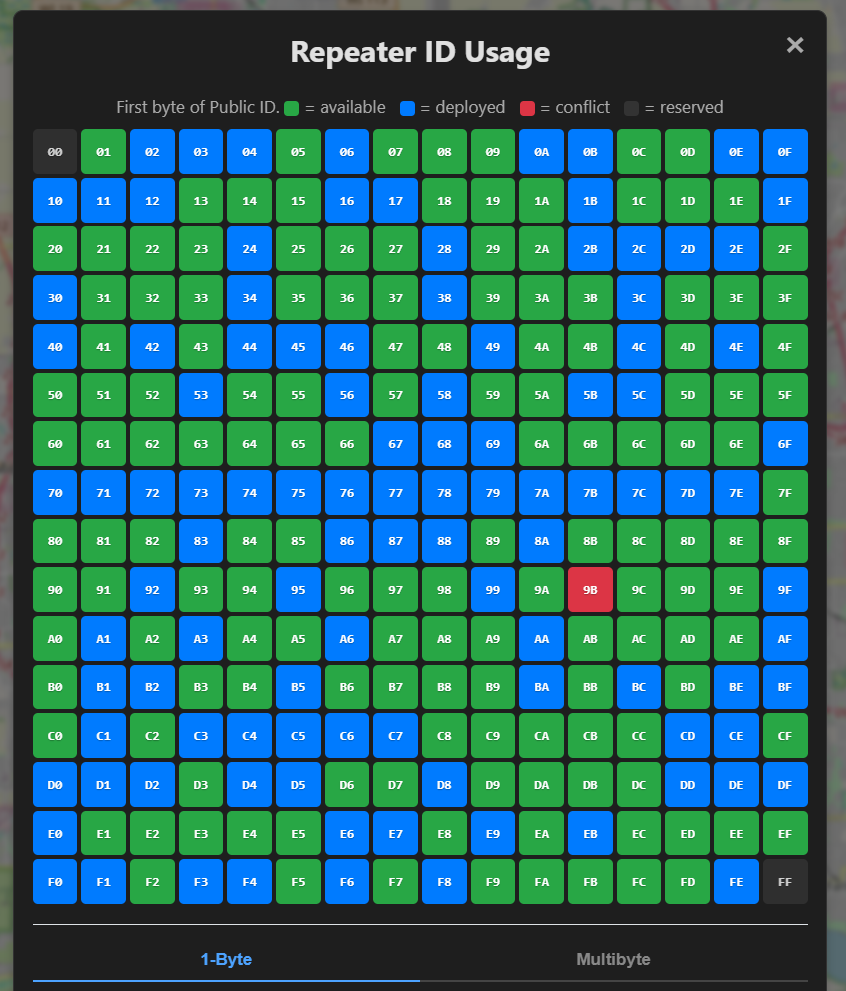
Click a cell to see who holds that ID and their byte modes; a 1-Byte / Multibyte tab switches address spaces.
-
Small, stable region? Grab a green cell
Pick an available (green) first byte that isn’t deployed — a 1-byte ID is fine.
-
Growing, or seeing red? Go multi-byte
Update to v1.14.1+, then on the repeater run
set path.hash.mode 1(2-byte) orset path.hash.mode 2(3-byte) and reboot. -
Re-check the grid
You should show as a clean, conflict-free entry; red collisions clear as the others upgrade too.
Running a repeater here?
Check your ID on MeshMapper, then compare notes with the operators in #meshcore.